
How to Make Free Calls Online: The Honest Guide (2026)
Free calls online actually exist — but only in five specific situations. The other 95% of "free calling" services are loss-leaders, ad-supported, or have a catch. Here is which is which.
Call from your browser — no app, no subscription
No install required. Use it in under 2 minutes.

If you search "free calls online" in 2026, you get a wall of websites promising free international calling to any phone in the world. Most of them are not lying — they are just leaving out the part where the call quality drops after 30 seconds, or where you watch an ad for 15 seconds before each call, or where "free" means "free for the first call to Brazil and $0.10/min for everything after."
Truly free online calling exists in five specific situations. Outside of those five, you are either paying with attention (ads) or with quality (degraded codec). Here is the honest breakdown.
The Five Situations Where Calls Are Actually Free
1. App-to-app calls between two people who use the same app. WhatsApp to WhatsApp, FaceTime to FaceTime, Signal to Signal, Messenger to Messenger — these are free because both ends are on the internet. No phone network is involved. The catch: both people need the same app installed and the same account. You cannot use this to call a regular phone number from a stranger.
2. WiFi calling on your existing carrier plan. Most major US, UK, and Canadian carriers route calls over WiFi when you are connected to it. They are free in the sense that they do not use cellular minutes, but they are not "free calls online" — they are normal cellular calls that happen to use your WiFi as the transport. They still count against your plan minutes, and international calls are still charged at your carrier's international rate.
3. Calls placed from your computer to your own phone via a continuity feature. macOS calling, Windows Phone Link, and similar features let you place a call from your laptop using your phone's connection. Free because no extra service is involved — same minutes you would have used anyway.
4. Free trial credits. Many calling services give you a small free balance to try them. Kinvo does not currently offer a free-trial balance, but you can sign up and verify a caller ID for free; the dialer is functional before you add credit. Other services offer $0.50–$2 to start. This is "free" for one short call.
5. Tools where the cost is borne by someone else. Doctor's offices, schools, and customer-support lines that are toll-free (1-800 in the US) are paid for by the receiver, not you. The call is free to you, but someone is paying for it.
The Catch with "Free Web Calling" Services
Websites that let you dial any phone number from a browser without signing up typically work like this:
- You get one or two calls before the limit kicks in. Some let you call for a fixed time (often 90 seconds to 5 minutes per call). After that, the call cuts off and you have to start a new one or sign up.
- You watch an ad before each call. The ad revenue funds the call. Skip-ads usually means skip the call too.
- You enter your email or phone number to "verify" you are human. That data is sold; the call is paid for by the lead-gen value of your contact info.
- The quality is intentionally degraded. Codec choices, dropped packets, no echo cancellation — the call works but barely. The point is to push you to the paid tier.
None of these are scams. They are real businesses with real costs (telcos charge real money for calls), and they are trading some friction for the appearance of "free." If you only need to make one short call and you can tolerate ads or quality issues, they work fine. For anything else, the friction adds up faster than the dollars you save.
What Does a Real International Call Cost in 2026?
For context, here is what major destinations actually cost from a transparent pay-as-you-go service:
| Destination | Per-minute rate | 10-minute call | 30-minute call |
|---|---|---|---|
| US/Canada landline | $0.05 | $0.55 | $1.55 |
| UK landline | $0.05 | $0.55 | $1.55 |
| India mobile | $0.15 | $1.55 | $4.55 |
| Mexico mobile | $0.15 | $1.55 | $4.55 |
| Philippines mobile | $0.18 | $1.85 | $5.45 |
| Nigeria mobile | $0.34 | $3.45 | $10.25 |
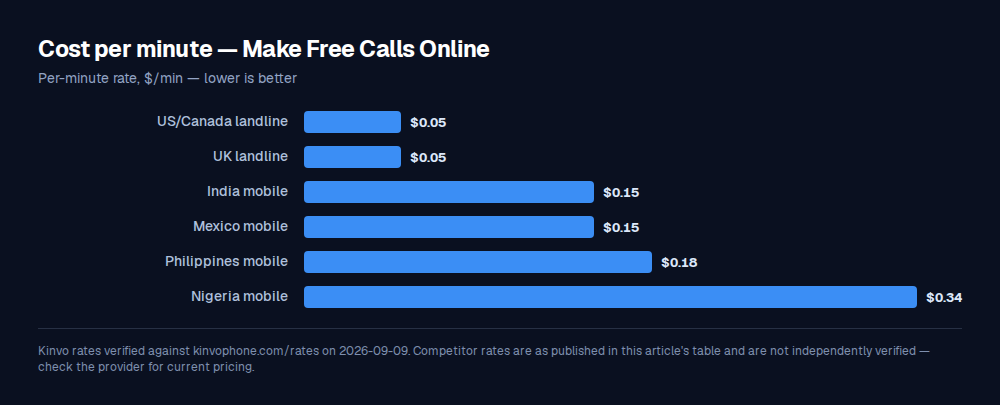
A 10-minute call to most major destinations costs less than a coffee. The "free" option saves you 35 cents — at the cost of an ad, a session timeout, or a low-quality codec. If you are calling once a year, the savings might be worth the friction. If you are calling weekly, the math flips fast.
How Free Calling Apps Make Money
If you are wondering why "free" services can afford to give away international calls, the answer falls into five buckets:
- Ads. The simplest model. You watch an ad, they make $0.01–$0.05 from the ad network, and they cover the call cost. Works when the ad CPM is higher than the call cost — fine for US/Canada, doesn't work for Nigeria.
- Lead generation. Your email or phone number is sold to marketing databases. Each verified lead is worth $1–$10 to certain buyers (insurance, education, financial services). One signup pays for thousands of cheap calls.
- Freemium upsell. Free first call, then paid. Many people who place a successful call come back and add credit.
- Cross-subsidy from another product. Google Voice is free because Google makes money on you elsewhere. Skype was free in many directions because Microsoft was paying for the loss as a market-share play.
- The call is not actually completing. Some "free" services route calls through cheap, unreliable carriers in jurisdictions that do not charge them properly. The call works most of the time; when it does not, you blame your own connection.
None of these are inherently bad. But they are the explanation for "how is this free" — and the answer in every case is "it is free to you because someone or something else is paying."
Why Kinvo Charges
Kinvo costs $0.05–$0.10/min for the most-called destinations (US, Canada, UK, Mexico, Western Europe) because we pay our VoIP carriers the wholesale rate for each call, and we add a small margin to fund the company. We do not run ads, sell your data, or cross-subsidize from another product line. The price is the price.
The benefit of that model: your call quality is not the variable being optimized down. A free service that has to make money on ads or lead gen has every incentive to push the call quality just below the line where you would stop using them. A paid service has the opposite incentive — they make money only when you keep coming back, which means the call has to be good.
When Each Option Is Right
| Use case | Best option |
|---|---|
| Calling a friend who has WhatsApp/FaceTime/Signal | Use that app. Truly free, no friction. |
| One short call to a landline this year | An ad-supported free web caller. Friction is worth the $0.35 savings. |
| Calling internationally more than once a month | Pay-as-you-go service like Kinvo. The friction of free becomes a real time cost. |
| Calling for work or business reasons | Pay-as-you-go service. Quality and reliability matter, and ad-supported services are not reliable enough. |
| Calling from a number that isn't your personal mobile | Browser-based service like Kinvo with verified caller ID. Calls come from a real number, recipient picks up. |
FAQ
Is there a website where I can make free phone calls online?
Several exist, but with caveats: most limit you to one or two calls per session (often 90 seconds to 5 minutes), require you to watch an ad before each call, or collect your email for lead generation. The call quality is typically lower than a paid service because the business model depends on pushing you to the paid tier.
How can I make a free phone call from my computer?
If the person you are calling has the same app installed (WhatsApp, FaceTime, Signal, Messenger), call them through that app — it is genuinely free because no phone network is involved. If you need to call a regular phone number, your best paid option is a browser-based service like Kinvo: no app to install, $5 minimum top-up, and calls cost $0.05–$0.10/min to the most-called destinations.
Are there really free international calls?
Yes, but only in specific situations: app-to-app calls between two users of the same service (WhatsApp, FaceTime, Signal, etc.), free-trial balances on some calling services, or toll-free numbers paid for by the recipient. For calling a regular phone number internationally without any catches, expect to pay $0.03–$0.20/min depending on the destination.
What is the difference between WiFi calling and a calling app?
WiFi calling is your existing carrier routing your normal phone calls over WiFi when you are connected to it — the call still uses your cellular plan minutes and international rates. A calling app or browser-based service (like Kinvo) is a separate VoIP service that places the call directly over the internet at its own rates, completely independent of your carrier plan. WiFi calling is "free" if you have a generous carrier plan; a calling app is "cheap" but works the same regardless of your carrier.
What is the catch with free online calling?
The catches break down into four categories: (1) ads — you watch one before each call, (2) data collection — your email or phone number is sold, (3) session limits — calls cut off after 90 seconds or 5 minutes, and (4) quality degradation — calls work but with audible artifacts, choppy audio, or echo. Some free services have one of these; cheap ones have several. Paid services like Kinvo charge a small per-minute rate ($0.04/min and up) in exchange for none of them.
The Honest Conclusion
If you can call your contact app-to-app, do that — it is genuinely free and the quality is excellent. If you need to call a real phone number and you only do it occasionally, an ad-supported free web caller is fine. If you call internationally more than once a month or you need the call to actually go through reliably, the few cents a minute you save by going free are dwarfed by the time you spend dealing with the friction.
Kinvo sits in that "more than once a month, needs to work" space: $5 minimum top-up, $0.05–$0.10/min to the most-called destinations, runs in your browser, no app to install, no ads, no expiration on credits. Try it in your browser — the dialer loads in under a second.
Ready to start calling?
Sign up and get bonus credits on your first purchase. No app download needed — start calling from your browser in under 60 seconds.
Start CallingFind our guides again — mark Kinvo as a source you trust and Google will surface us more often in your Search, Discover and AI results.
Add Kinvo as a preferred source