
WiFi Calling vs VoIP: Which Is Cheaper for International Calls?
WiFi calling and VoIP both use the internet, but one still charges carrier rates. Learn the difference and how to save up to 95% on international calls.
Last updated: May 19, 2026
Call from your browser — no app, no subscription
No install required. Use it in under 2 minutes.

WiFi calling still charges your mobile carrier's international rates ($0.15-$3.00/min) because it routes through your carrier's network. VoIP services like Kinvo bypass carriers entirely and charge $0.01-$0.15/min — a 90-95% savings. Both use the internet, but they are fundamentally different services with very different pricing.
WiFi calling and VoIP both use the internet to make phone calls. So they should cost the same, right? They do not — and confusing the two is one of the most expensive mistakes people make when calling internationally. WiFi calling uses your carrier's network and charges your carrier's rates. VoIP uses an independent service and typically costs 90-95% less.
This guide explains exactly how each technology works, why the price difference is so large, and which one to use for international calls.
What Is WiFi Calling?
WiFi calling is a feature built into your smartphone (iPhone, Android, and most modern devices support it). When enabled in your phone's settings, your device uses WiFi instead of cell towers to connect calls. The key word is "instead" — it is still your carrier handling the call. Your carrier's billing, your carrier's rates, your carrier's per-minute charges all apply exactly as if you were on the cell network.
WiFi calling was designed to solve coverage problems, not cost problems. If you are in a building with poor cell reception but good WiFi, WiFi calling lets your phone route the call over the internet to your carrier, which then completes the call normally. You see the same caller ID, the same call history, and the same charge on your bill.
How WiFi calling works technically:
- Your phone establishes a secure IPsec tunnel to your carrier's evolved Packet Data Gateway (ePDG)
- Voice packets travel over WiFi to the carrier's core network
- The carrier routes the call through the PSTN (public switched telephone network) like any normal call
- Billing is identical to a cell call — same plan, same rates, same overages
What Is VoIP?
VoIP (Voice over Internet Protocol) is a fundamentally different approach. Instead of tunneling back to your carrier, a VoIP service routes calls through its own infrastructure. VoIP providers like Kinvo purchase wholesale telephone capacity from carriers around the world and pass the savings on to consumers. The call never touches your mobile carrier at all.
How VoIP works technically:
- Your device (browser, app, or IP phone) connects to the VoIP provider's servers over the internet
- The VoIP provider uses WebRTC, SIP, or similar protocols to handle the audio
- The call is routed to a telephony gateway in or near the destination country
- The gateway completes the last mile to the recipient's phone over the local PSTN
- Billing is from the VoIP provider at wholesale-derived rates — pennies per minute
The Price Difference Is Enormous
Here is a concrete comparison. Suppose you are in the United States calling a mobile number in India for 30 minutes:
| Method | Rate/min | 30-min call cost | Annual cost (2 calls/week) |
|---|---|---|---|
| AT&T WiFi Calling | $2.00/min | $60.00 | $6,240 |
| T-Mobile WiFi Calling | $1.50/min | $45.00 | $4,680 |
| Verizon WiFi Calling | $1.79/min | $53.70 | $5,585 |
| Carrier International Plan | $0.25/min* | $7.50 + $15 plan | $1,560 |
| Kinvo (VoIP) | $0.02/min | $0.65** | $67.60 |
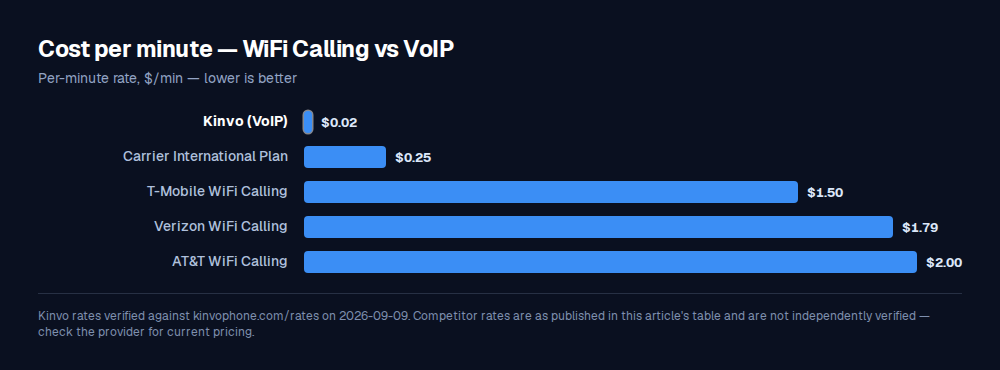
*With $15/month international calling add-on. **Including $0.05 connection fee.
The difference is not a rounding error. A regular caller to India saves over $5,000 per year by switching from WiFi calling (carrier rates) to VoIP. Even compared to a carrier international plan, VoIP is 95% cheaper.
Why WiFi Calling Is NOT Cheaper for International Calls
The confusion is understandable. "WiFi calling" sounds like "calling over WiFi" which sounds like "internet calling" which sounds like it should be cheap. But WiFi calling is not an internet calling service — it is your carrier's service delivered over a different pipe. Think of it like this:
- WiFi calling = your carrier's international rates, delivered over WiFi instead of cell towers
- VoIP = an independent service's international rates, which are 50-100x cheaper
The reason carriers charge so much for international calls is not that the calls are expensive to deliver — they are not. International wholesale voice termination costs fractions of a penny per minute in most corridors. Carriers charge $1-3/min because they can. VoIP services charge $0.05-0.20/min to popular destinations because they compete on price.
When WiFi Calling IS Useful
WiFi calling is not useless — it solves specific problems:
- Poor cell coverage indoors: If your office or home has weak cell signal but strong WiFi, WiFi calling ensures your calls do not drop
- Domestic calls with bad reception: For calls within your country where you are already paying $0/min or a flat rate, WiFi calling just improves reliability
- Emergency calls: WiFi calling can route 911/112 calls when you have no cell signal — a genuine safety feature
- Traveling domestically: In areas with WiFi but no cell coverage (basements, rural cafes), WiFi calling keeps you connected
The point is: WiFi calling fixes connectivity, not cost. If your problem is "international calls are too expensive," WiFi calling does not help at all.
WiFi Calling Abroad: The Trap
Here is where the confusion gets truly expensive. Many people enable WiFi calling before traveling internationally, expecting to make cheap calls from their hotel WiFi. What actually happens depends on your carrier:
- T-Mobile: WiFi calling from abroad to US numbers is typically included. Calls to local numbers in the country you are visiting are NOT covered and charged at international rates.
- AT&T: WiFi calling from abroad works like calling from home — US domestic calls are included in your plan, but international calls still incur per-minute charges.
- Verizon: Similar to AT&T. WiFi calling abroad avoids roaming for calls back to the US, but calling local numbers costs international rates.
In other words, if you are in the UK and want to call a UK number while on WiFi calling, your US carrier may charge you $1-3/min for what is essentially a local call. A VoIP service like Kinvo would charge $0.05/min to a UK landline because it routes the call locally.
VoIP for International Calls: How to Get Started
Switching to VoIP for international calls takes under 2 minutes:
- Choose a VoIP provider. For calling phone numbers (not app-to-app), services like Kinvo offer browser-based calling with pay-as-you-go pricing. No download needed.
- Check rates. Use the call cost calculator to see exact costs to the countries you call. Compare with your carrier's international rates.
- Buy credits. Most services start at $5. With Kinvo, $5 gets you 250+ minutes to US/UK landlines or 80+ minutes to India mobile.
- Dial from your browser. Open the dialer, enter the number with country code, and call. The best time to call tool helps you pick a time that works across time zones.
Your carrier does not need to know. You are not changing your phone plan or porting your number. VoIP is simply a separate service you use for international calls, the same way you might use WhatsApp for messaging even though your carrier offers SMS.
Can You Use Both?
Absolutely — and most people should. Here is the optimal setup:
- Keep WiFi calling enabled on your phone for domestic calls and emergencies. It improves indoor coverage at no extra cost.
- Use VoIP for all international calls. Open your browser (or a VoIP app), dial the international number, and pay $0.05-0.20/min instead of $1-3/min.
- Use WhatsApp/FaceTime for free calls when the other person has the same app. See How to Call Internationally for Free for more options.
There is no conflict between WiFi calling and VoIP. WiFi calling is a phone setting. VoIP is a separate service. You can have both active simultaneously.
Quality Comparison
A common concern: does VoIP quality match WiFi calling? In 2026, yes — and it often exceeds it. Modern VoIP services use the Opus codec at 48kHz, delivering what the industry calls "HD voice." WiFi calling typically uses AMR-WB (also called HD Voice), which is good but limited to 16kHz. On a stable internet connection (100+ kbps), VoIP calls sound noticeably richer and clearer than carrier calls. Both depend on your internet quality, but since both travel over your WiFi, the variable is the same.
Bottom line: WiFi calling uses your carrier's rates — it makes calls more reliable, not cheaper. VoIP uses independent infrastructure and costs 90-95% less for international calls. A 30-minute call to India costs $60 on carrier WiFi calling versus $0.65 on Kinvo. Keep WiFi calling enabled for coverage, but always use VoIP for international calls. Check VoIP rates to any country.
Frequently asked questions
Is WiFi calling the same as VoIP?
No. Both use the internet, but WiFi calling is your mobile carrier's service routed over WiFi instead of cell towers — you keep your phone number and your carrier still bills you at carrier rates. VoIP is an independent service (Kinvo, Google Voice, etc.) that handles the entire call outside your carrier and bills you at wholesale-derived rates that are typically 90 to 95 percent cheaper for international calls.
Which is better, WiFi calling or VoIP?
For domestic calls and emergencies, WiFi calling is better because it uses your existing number and integrates with your carrier. For international calls, VoIP is dramatically better because it costs $0.02 to $0.10 per minute instead of the $1 to $3 per minute carriers charge over WiFi calling. Most people should use both: WiFi calling for everyday domestic reliability, VoIP for every international call.
Does WiFi calling cost extra for international calls?
Yes. WiFi calling uses your carrier's international rate sheet — the exact same prices you would pay over the cellular network. A 30-minute call to India runs $45 to $60 depending on carrier. WiFi calling does not include international minutes, does not bypass roaming, and does not unlock wholesale telephone rates. It only changes how the call reaches your carrier.
What is the main disadvantage of VoIP?
VoIP requires a stable internet connection. If your Wi-Fi or mobile data drops, the call drops. VoIP also cannot reliably dial emergency services (911 in the US, 112 in the EU) because emergency services need to know your physical location and VoIP routes calls through the cloud. Keep a mobile plan with WiFi calling enabled as a fallback for emergencies; use VoIP for everything else.
What is the downside of WiFi calling?
The biggest downside is cost confusion: people assume WiFi calling makes international calls cheap because the word "WiFi" is in the name, and it does not. WiFi calling is also tied to one specific phone number and SIM card, so you cannot use it from a laptop or a different device. Some carriers also charge extra abroad, and WiFi calling does not work on every device or with every carrier plan.
Can the police trace a VoIP call?
Yes. A VoIP provider keeps call detail records (originating account, destination number, timestamps, IP address of the caller) and can produce them under a lawful subpoena. VoIP is no harder to trace than a regular mobile call once law enforcement obtains a warrant — and in many cases it is easier because the records are already digital and centralized.
Is WiFi calling the same as VoIP on iPhone?
No. On an iPhone, WiFi calling is the setting under Phone → Wi-Fi Calling that routes your carrier minutes over WiFi. VoIP on iPhone is a separate app or browser tab (like Kinvo in Safari) that uses an independent calling service. You can have both running at the same time — they do not conflict because they use different number pools and different billing.
How can I tell if my call is going over WiFi calling or VoIP?
If the call is initiated from your phone's native Phone app and shows your normal carrier number as the caller ID, it is WiFi calling (or a regular cell call). If the call is initiated from a third-party app, a browser tab, or shows a different caller ID, it is VoIP. Check your monthly carrier bill — WiFi calls appear there at carrier rates, VoIP calls do not.
Ready to start calling?
Sign up and get bonus credits on your first purchase. No app download needed — start calling from your browser in under 60 seconds.
Start CallingFind our guides again — mark Kinvo as a source you trust and Google will surface us more often in your Search, Discover and AI results.
Add Kinvo as a preferred source